
Create offers for your salon or spa, share them with clients and keep track of where they are redeemed. SalonBridge brings your promo codes into the same system you use for bookings, retail sales and client accounts.
Give your next promotion a code clients can use
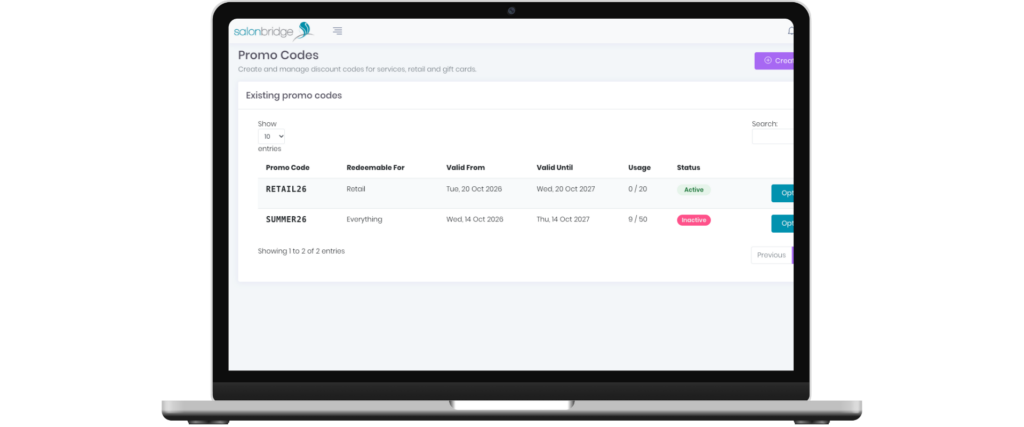
Build an offer around your business
Choose whether your code applies to services, retail products, gift card purchases or all eligible categories. Offer a percentage discount or choose a fixed amount when creating a service promotion.
Set the dates when the code can be redeemed and the total number of uses available. You can give each campaign its own code, making a seasonal offer or product promotion easier to manage.
Keep the conditions clear when sharing your offer. Validity dates control when the code is redeemed, so a client may use it to book an appointment taking place later.
Accept codes online and at reception
Enable promo codes on your supported online booking and shopping pages so clients can apply an offer themselves. Your team can also apply a code to a client account, preview the eligible items and check the revised total before confirming.
Items that already have a discount keep their existing discount. This helps your team see which purchases qualify when applying an offer.
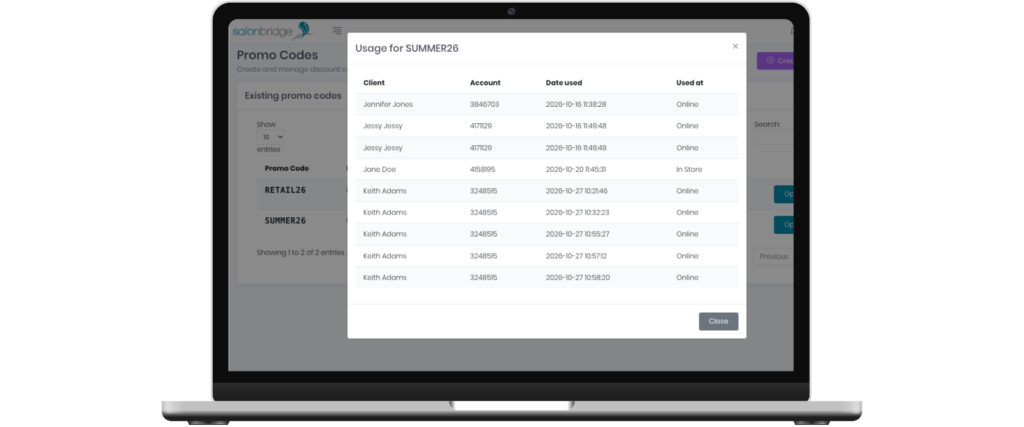
See how your promotion is being used
Review the number of redemptions alongside the code’s usage limit. Open its history to see the client, associated account, redemption date and whether the code was used online or in-store.
You can also download a promotional image using your business logo and online booking colours, ready to share with clients or on social media.
Questions about promo codes
Set a total redemption limit and validity dates. The limit applies across the campaign, so a client may use the code again while it remains valid and uses are available.
Yes. Gift card promotions apply a percentage discount to the purchase of a gift card.